What's New With Control4 in 2026: A Practical Guide for Ottawa Owners

If your Control4 app looks nothing like it did two years ago, that's X4. Control4 rebuilt the whole interface, and it has kept adding to it all year. There's also a new doorbell, a new in-wall touchscreen and more lighting hardware.
Some of it is worth doing this winter. Some of it can wait. And a few older parts are reaching the end of the road, which you want to know before an update and not after. Here's what changed, in plain terms, from Control4's own release notes and spec sheets.
X4 is the new app, and not every system can run it
X4 is Control4's name for OS 4. The full release came out in April 2025, and it changed how you get around your house on the phone, the tablet and the touchscreens.
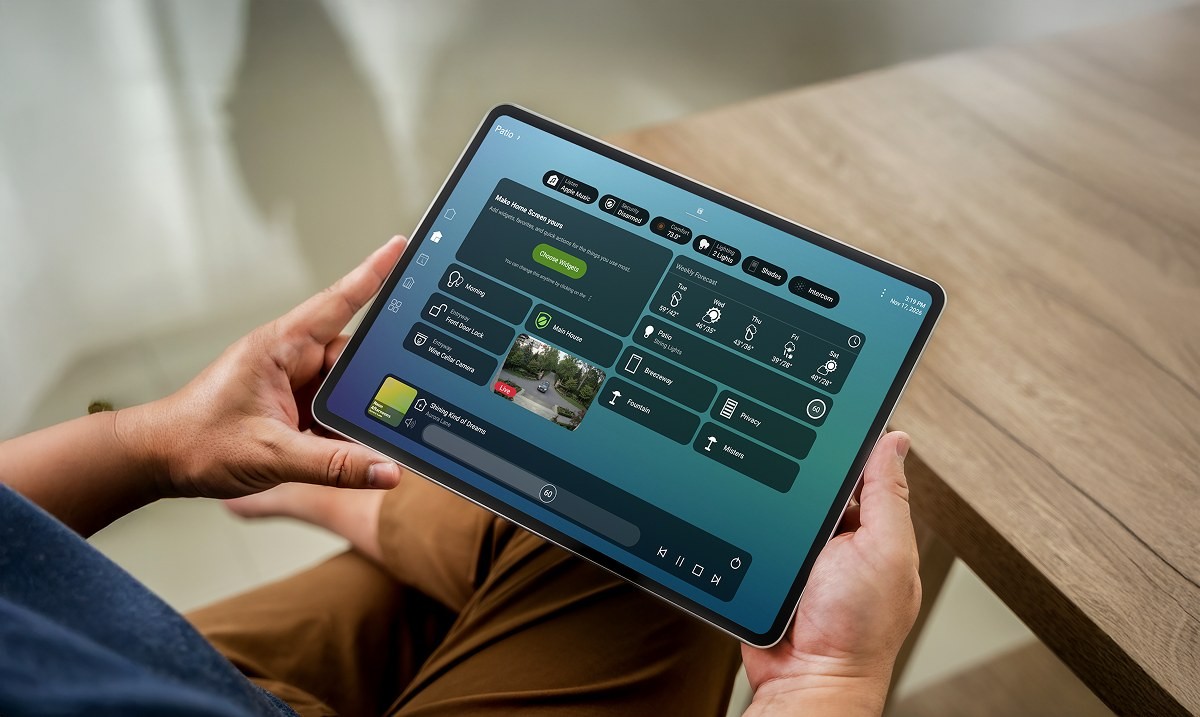
The big piece is the new Home Screen. Little status chips across the top show what's on, what's open and what's playing. You can pin a favourite to the Home Screen or to a single room. Widgets put more control on the first screen, so fewer taps. A mini player at the bottom runs every active music session, and you can start a song in several rooms at once without walking into each room in the app first.
Then there are Routines. These are ready-made automations you pick from a gallery, and the gallery only shows the ones that fit the gear in your house. A timeline shows what's coming up, with a button to run one now or skip it once. Handy the morning you're home sick and don't want the shades flying open at 7. Control4's fall 2026 update added scheduling for motorized shades and for music playlists through the day.
iPhone users also get HomeKit setup right in the Control4 app. Once it's linked, Siri works on the iPhone, HomePod, Apple Watch, CarPlay and Apple TV.
Now the fine print. Control4 lists three requirements for X4:
- A CORE, CA or EA series controller.
- An active Connect or Assist subscription.
- The new Control4 mobile app.
The system also has to be on OS 3.4.1 or later before it can jump to X4. If your controller is an older HC-series box, it isn't on that list. That's when an upgrade turns into a hardware conversation.
The parts X4 leaves behind
This is the bit people miss. Control4 says X4 is the last build for some legacy devices:
- T3 touchscreens, both in-wall and tabletop, 7 and 10 inch.
- First and second generation Control4 dimmers, switches and keypads.
- The on-screen display on EA-1, EA-3 and EA-5 controllers. The controllers stay supported. Only the on-screen menu goes away.
Those devices can update to the first X4 release, but later versions won't support them. To get anything newer than 4.0, they have to be removed or replaced. So they don't have to come out the day you upgrade. You just won't get newer releases until those pieces are dealt with.
So before any update, we pull the device list from the project and mark anything on that list. Then you decide what to replace now and what can ride for a while.
OS 4.3: cameras and the front door
The newest release, OS 4.3, was announced on October 21, 2026. Most of it is about cameras and doors.
The Enhanced Surveillance experience is now standard on X4. Quick Actions sit next to the live camera image, so you can see who's in the driveway and turn on the lights, lock the door or close the garage from the same screen. A new communication system lets you talk back from the live view on supported door stations and doorbells. The fall update also brought full video playback and an event timeline from Luma recorders into the Control4 app, so there's no second app for cameras.
OS 4.3 also opens the door to Zigbee 3.0 devices from other brands, through drivers Control4 writes. Kwikset and Yale smart locks are first, with Somfy shades next. Control4 says a developer kit for other Zigbee makers is planned for 2027. Don't read that as "any Zigbee gadget works". Only models with a Control4 driver are supported. If cameras are part of your plan, our post on wired vs wireless security cameras covers the basics.
Chime Pro, and a word about our winters
The original Chime doorbell has a replacement. The Chime Pro has two cameras. The main one records up to 3840 x 2160 with a 150 degree horizontal view. A second camera points down at the step at up to 2560 x 1440, so the box on your mat is in the shot. It detects people, vehicles and packages on the doorbell itself. It has infrared night vision, a downward LED light, two-way audio, an SD card slot up to 256 GB and up to seven days of cloud storage. It can also record to a Luma NVR. It comes in Black or Antique Bronze.
Three things to know before you order one:
- It's wired only. Chime Pro runs on 802.3af Power over Ethernet. There's no Wi-Fi version, so you need an Ethernet cable at the door and a PoE switch or injector. Old two-wire doorbell wire won't do it.
- It needs OS 4.3.0 or later. Control4 also notes it isn't supported by Luma Bridge or Luma Insights.
- Check the temperature rating. Chime Pro is rated to operate from -20°C to 60°C. The original Chime PoE was rated down to -40°C. Ottawa gets nights colder than -20°C most winters.
That last one doesn't mean you can't use it here. It means where it goes matters. A recessed entry or a covered porch is a different spot than a bare wall facing the wind. We'd look at your door before recommending it, and not just swap it in.
The T5 touchscreen
The T5 replaces the T4 for in-wall screens. It comes in 8 and 11 inch sizes, both 1920 x 1200, in matte Midnight Black or gloss White. A proximity sensor wakes it as you walk up and shows what's playing. There's a dark mode for a theater, a quad microphone array for intercom and a camera of about 720p.
For installs, it's one piece and runs on PoE at 13 watts peak, with an optional AC adapter where there's no PoE. Magnetic trims match most Lux colours, except the metallic ones, and a primer trim can be painted on site to match your wall. It fits a standard 2-gang box and needs OS X4.2 or later. It's rated for indoor use from 0°C to 40°C, so it's not a screen for an unheated garage or sunroom.
The T5 is in-wall only. If you want a screen on the kitchen counter, the T4 tabletop is still the one.
Remotes and lighting
For remotes, the Halo is the current everyday Control4 remote. It has a 2.8 inch colour screen above a full set of backlit buttons, push-to-talk voice and Wi-Fi on 2.4 or 5 GHz. It also reports its battery and Wi-Fi signal to OvrC, so with monitoring in place, a weak battery can show up on our side before you notice it. We wrote more about one remote for the whole family.
On lighting, Control4 added Lux standard 15 amp outlets, no-neutral dimmers, mechanical switches and motion dimmers to the Lux line. Its Vibrant line now includes smart bulbs and recessed trim lights that dim down to one percent with no gateway. If your house already runs Lutron, that's fine too. We install Lutron as well as Control4 lighting, and our lighting control page shows the options. Ask us what's available in Canada before you plan around a specific part.
What we check before an upgrade
If you own a Control4 system and want X4 or one of the new parts, this is the order we go in:
- Controller model and current OS version.
- Your Connect or Assist subscription status.
- Any T3 screens or Gen 1 and 2 lighting in the project.
- Ethernet and PoE at the door and at each screen location.
- The health of your network, since X4 and cameras lean on it.
- A full project backup before anything gets updated.
The network part is where most trouble starts. If the Wi-Fi drops, the app gets blamed. Our Wi-Fi and networking page explains how we set that up.
Book a Control4 checkup
We're a Control4 dealer in Ottawa, and we look after our own installs and systems another company put in. If yours has been acting up, read what we do when a Control4 system has problems. A service plan adds monitoring, so we can spot and fix many problems remotely. Our post on remote monitoring explains what we can and can't see.
Call us at (613) 830-6787 or send us a message with your controller model if you know it. You can also come see Control4 running at our showroom, 1344 Youville Drive in Orléans.
Frequently Asked Questions
Can my older Control4 system run X4?
X4 needs a CORE, CA or EA series controller, an active Connect or Assist subscription and the new Control4 app. The system has to be on OS 3.4.1 or later before it can upgrade. Older HC-series controllers are not on the supported list.
Will my T3 touchscreen or old keypads stop working after X4?
Not right away. Control4 says T3 touchscreens and Gen 1 and Gen 2 dimmers, switches and keypads can update to the first X4 release but will not be supported in later versions. To get features after 4.0, they need to be removed or replaced.
Does the Control4 Chime Pro doorbell work on Wi-Fi?
No. Chime Pro runs only on 802.3af Power over Ethernet, so it needs an Ethernet cable at the door and a PoE switch or injector. It also requires Control4 OS 4.3.0 or later.
Is the Chime Pro rated for Ottawa winters?
Control4 rates Chime Pro to operate from -20°C to 60°C, with an IP55 outdoor rating. Ottawa nights can go colder than that, so the mounting spot matters. A recessed or covered entry is a better place than an exposed wall.
Can the T5 touchscreen sit on a counter?
No. The T5 is in-wall only, in 8 and 11 inch sizes. Control4 still offers the T4 for tabletop use.
